User guide
Troubleshooting and FAQ
The things that most often go wrong, what they mean, and how to fix them without contacting support.
Most of what goes wrong in Brandora is a state the product is deliberately telling you about rather than a fault. This page collects the messages people hit most often, what each one actually means, and what to do about it without contacting support.
Monitoring
A project is marked Stale or Delayed
What it means. The badge reports how long ago the project last collected: Fresh is under 6 hours, Delayed is 6 to 48 hours, Stale is over 48 hours or never. It reports data age, not health.
What to do. Check the project status first: a paused or archived project ages towards Stale because collection has stopped by design. If it is Active, press Reingest rather than waiting for the next scheduled pass, roughly six hours away.
A source returned nothing
What it means. Usually one of three things: the source is not ticked on the project, the project is not Active, or a paid source was skipped because the monthly provider budget is spent. A skipped paid source is not an error, and free sources in the same run still collect.
What to do. Check the source chips under the project title. Admins also see a provider budget card there with units spent, units remaining and spend per source. If the budget is the problem, wait for next month or move to a plan with a larger one.
Reingest says the project is not collecting
What you see. "This project is not collecting. Set it back to active before reingesting."
What it means. Reingest is refused on a paused or archived project rather than queueing a job that would quietly do nothing. Nothing was lost while it was paused.
What to do. Set the project back to Active. That queues a catch-up collection on its own, so you do not need to press Reingest afterwards.
Nothing in the mention feed
What it means. Filters, nine times out of ten. The empty state says "Nothing matches the current filters" rather than "no mentions", because the two are different.
What to do. Use Clear on the filter bar, particularly the From and To dates. If the feed is still empty with no filters, the project has genuinely collected nothing: see the two entries above.
Alerts and notifications
An alert rule never fires
What it means. Three causes, in order of likelihood. The rule has no threshold, because the New rule form does not collect one. Nobody has evaluated it, because evaluation is on demand and there is no scheduled sweep. Or its type is Sentiment spike, Campaign anomaly or Provider sync failure, none of which have an evaluator yet.
What to do. Press Evaluate to see at once whether it fires. Set conditions through the API if it needs a threshold, and prefer Mention spike, High-influence mention or Overdue deliverable. Alerts has the detail.
An alert notification never arrived
What it means. Either the channel is not connected, or the event was a duplicate. WhatsApp has no provider behind it, so a rule naming it sends nothing and says so on the rule row. A firing that matches an event already raised in the same bucket notifies nobody a second time, on purpose.
What to do. Check the bell in the header first: in-app notification is always available and never depends on a provider. If a rule row carries a channel warning, remove that channel or add email. For email, check spam, and confirm the address on your account is the one you read.
Links you shared
A guest review link no longer opens
What your client sees. "Cannot open this review", with a message saying the link has expired or been revoked, or "This link is not valid" for a token that matches nothing.
What it means. Guest links carry an expiry and can be revoked. Neither message reveals whether anything exists behind the link, which is deliberate.
What to do. Mint a fresh link from the submission and send that. See Client guest review.
A shared report link has expired
What your client sees. "This link has expired. Ask whoever shared it with you for a fresh link."
What it means. Share links last seven days by default. Minting a new link for the same snapshot also replaces the previous one, so an older link stops working the moment you create a newer one.
What to do. Open the snapshot, create a new share link, and send it. The snapshot itself is unchanged: the figures your client saw are the figures they will see again.
Data and limits
A creator's verified numbers are missing
What you see. Figures labelled Unavailable, or estimates where you expected verified data.
What it means. Verified numbers need two things: the creator has connected the account, and an active authorization lets your organization see it. A revoked or expired authorization ends future visibility. Brandora never substitutes an estimate for a missing first-party metric, so it shows the gap instead.
What to do. Ask the creator to grant your organization access from their portal. The estimate remains usable meanwhile, as long as you label it as one when you report it.
An import row was rejected, or a value disappeared
What you see. A per-row warning in the import preview, and a skipped count on the result.
What it means. A row with no creator name is skipped outright. Everything else is a value-level warning: a follower count or engagement rate that is not a number, an unrecognised gender or country, an age outside 13 to 100, or a duplicate of a row earlier in the file. The row still imports; the unreadable cell is left blank rather than guessed at.
What to do. Read the warnings column before confirming, since nothing is written until you do. Fix the source spreadsheet and re-upload. Importing creators lists every warning and what it means.
"This plan limit has been reached"
What it means. The action would cross an entitlement on your current plan. Brands and roster imports are enforced at the point of writing, and an import is refused before anything is stored if the whole file would not fit in the remaining capacity.
What to do. Open /billing to see which meter is at its limit, then either free up capacity or change plan. Nothing you already have is affected by hitting a limit.
Access and billing
The workspace is read-only
What you see. A banner such as "Your free trial has ended", "Billing is frozen" or "Your subscription is canceled". Admins are taken to /billing once as the session opens.
What it means. Premium changes are paused until a plan is active. Your data is untouched: nothing is deleted because a trial or a subscription lapsed.
What to do. An OWNER or ADMIN pays or picks a plan from /billing. Everyone else keeps reading and exporting, and the banner names who can act. See Billing, plans and usage.
"Your role does not permit this action"
What it means. The endpoint requires a higher role than you hold, and the response names both. A related message, "You are not a member of this organization", means the workspace in the URL is not one you belong to.
What to do. Ask an OWNER or ADMIN to raise your role, or to act for you. Workspace, members and roles lists what each role can do.
When something looks broken
"Could not reach the server", or the page is asking you to sign in again
Your connection dropped, or your session expired. Reload the page; if you land on the sign-in screen, sign in and carry on. A save that failed this way did not partially apply.
"The response did not match the expected shape"
Brandora validates every API response before rendering it, and refuses to display data it does not recognise rather than showing something misleading. This is a bug, not something you can fix from the interface. Note what you were doing and report it.
Checking whether it is you or us
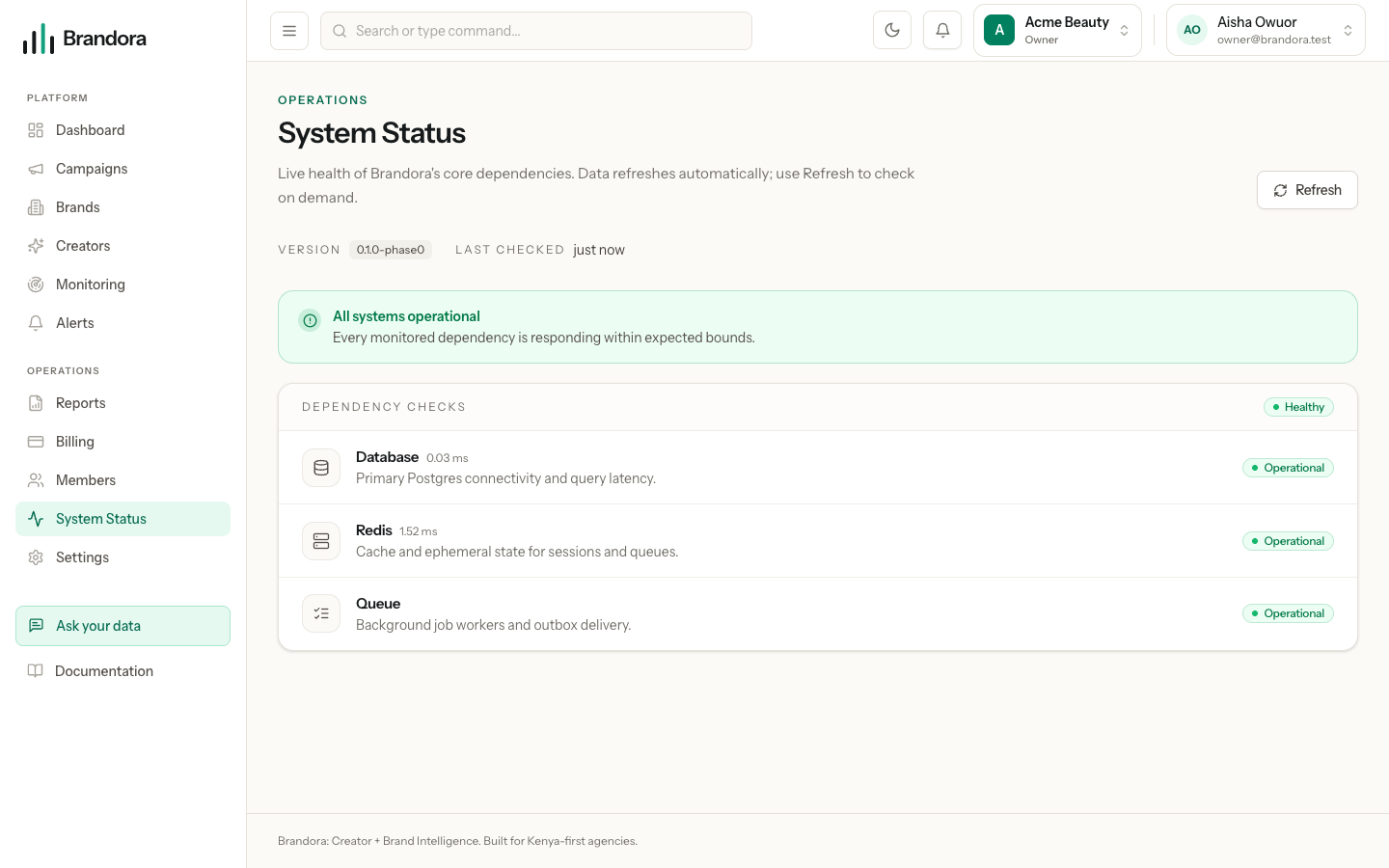
/status reports the live health of the core dependencies, with the latency of each check and when it was last refreshed. A degraded dependency there explains slow or failing saves across the whole workspace.