User guide
Brands, aliases and competitors
Set up the brand that anchors your campaigns and monitoring, with its aliases, products and competitors.
A brand is the anchor object in Brandora: campaigns are run for a brand, and monitoring projects listen for a brand. Neither can be created without one, so setting up your first brand is the first thing a new workspace should do. This page covers creating and organizing brands, and the three kinds of matching data that hang off them: aliases, products and competitors.
Creating a brand
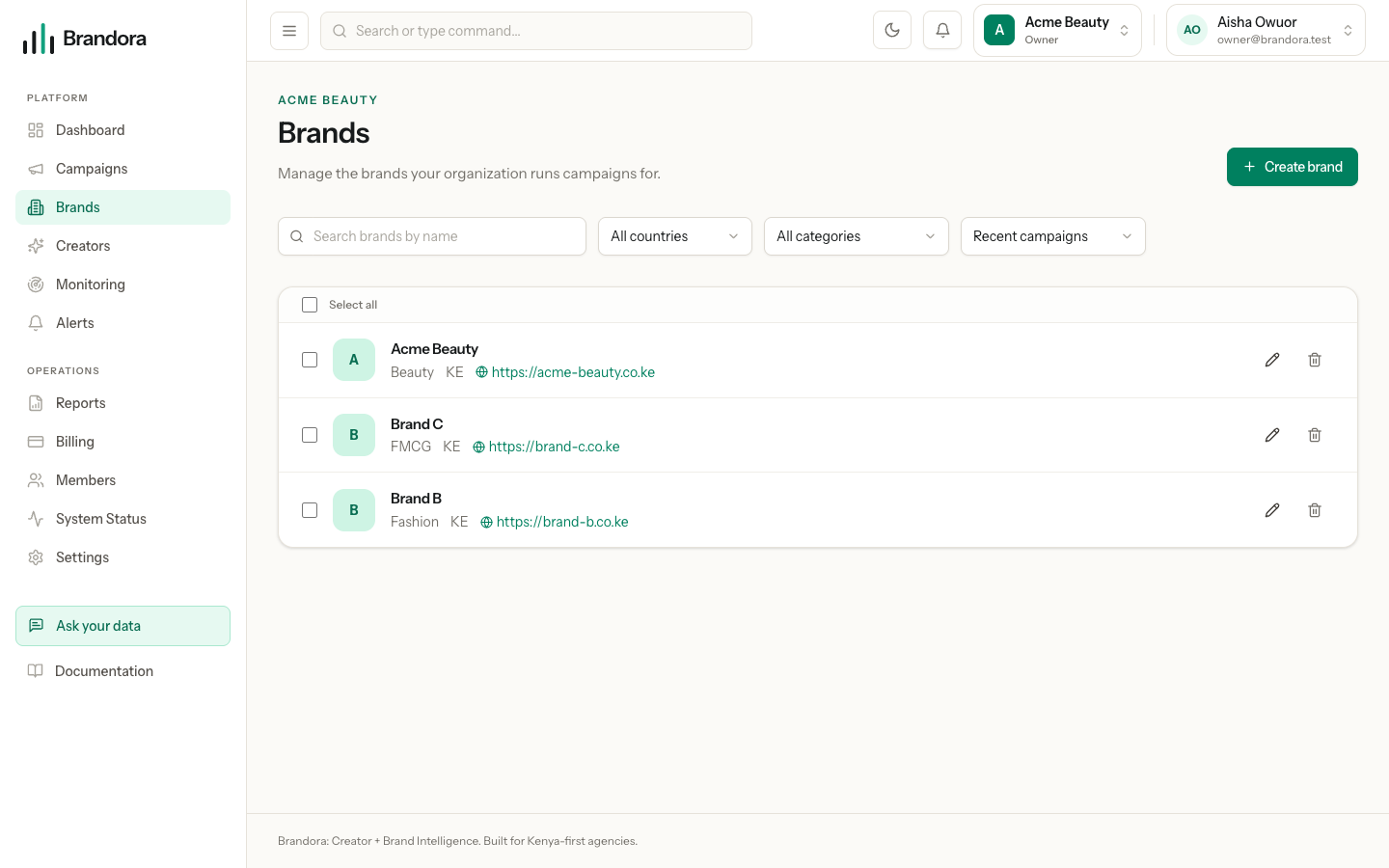
Open /brands and choose Create brand. Managers and above can create and edit; Admins and above can delete.
| Field | Required | Limits |
|---|---|---|
| Name | Yes | Up to 255 characters |
| Website | No | Must be a valid URL, up to 255 characters |
| Description | No | Up to 2000 characters |
| Industry | No | Up to 120 characters, free text |
| Primary market | No | Up to 8 characters, a market or country code such as KE |
| Brand logo | No | PNG, JPEG or WebP, uploaded through the workspace file store |
Brandora derives a URL slug from the name and keeps it unique inside your organization, appending -2, -3 and so on when it has to. You never type the slug and you cannot change it.
Brand names are not required to be unique. Two brands called "Acme" in one workspace are allowed and will simply get different slugs, so use Industry and Primary market to tell near-duplicates apart rather than relying on the name.
A brand with no logo shows a coloured initial rather than a broken image. Logos are served through short-lived signed links, so a brand image is never a permanently public URL.
Warning: Your plan caps how many brands a workspace may have. Starter allows one. When you hit the cap, creating another brand is refused with a message naming the entitlement and the limit, and the fix is to upgrade on /billing or delete a brand you no longer need.
Finding and ordering brands
The brands list shows every brand in the workspace on one page. There is no pagination.
- Search filters by name as you type, case-insensitively and on partial matches.
- Country filters on the exact Primary market value, and Category filters on the exact Industry value. Both dropdowns are built from the brands you already have, so they stay stable while a filter narrows the list.
- Sort offers three options: Recent campaigns (the default, ordering by the most recent campaign on each brand and pushing brands with no campaigns to the end), Manual order, and Name (A-Z).
Manual order is a saved position, not a local preference: drag handles and Move up and Move down appear only when the sort is Manual and no search or filter is active, and you confirm the new order with Save order. With a filter on, the page shows the hint "Clear filters to reorder brands." instead of the controls. That restriction exists because saving a manual order rewrites every position in the workspace, and a partial list would corrupt the order of the brands you had filtered out.
Deleting a brand
Deleting is an Admin action. Select rows and use Delete selected for a batch, or use the per-row Delete with its inline confirm. A batch is all or nothing: if any selected brand cannot be resolved inside your organization, the whole batch is refused and nothing is deleted.
Two consequences worth knowing before you delete:
- A deleted brand's slug stays reserved, so recreating a brand with the same name produces a suffixed slug.
- Deleting a brand does not delete or block on the campaigns and monitoring projects that reference it, and there is no undelete. If a brand is in use, rename it rather than deleting it.
Aliases
An alias records another way the brand is written or referred to: a product name, an executive's name, a domain, a social handle, a hashtag, or a common misspelling. Each alias has a type and a value.
| Alias type | Use it for |
|---|---|
NAME | Another trading name or a short form |
PRODUCT | A product that carries the brand |
EXECUTIVE | A named person the brand is discussed through |
DOMAIN | A website domain |
HANDLE | A social handle |
HASHTAG | A campaign or brand hashtag |
MISSPELLING | A frequent misspelling |
Note: Aliases and products are stored on the brand through the API and have no screen in the web app yet. They are also not yet read by mention matching: today the mention ingester matches on the brand's own name and on competitor names. Record aliases if you want them ready, but do not expect them to widen your mention feed right now. To catch a variant spelling today, add it as a required term on the monitoring project's query rules instead.
Products
A product belongs to a brand and carries a name plus its own list of alias strings. Like brand aliases, products are API-only today and are not consumed by matching, ingestion or analytics. Treat them as a catalog you are keeping for later rather than as an active signal.
Competitors
Competitors are the one piece of this that is fully live, and they are attached to a monitoring project, not directly to a brand. That is deliberate: a competitive set is the set you are listening against on a particular project, and the same brand can be watched against different sets on different projects.
A competitor is a name plus optional aliases. You can add and remove competitors, but not edit one, so correcting a name means deleting and re-adding it.
What they do: during ingestion, each mention is scored against the subjects of the project. The brand carries the heaviest weight and each competitor a lighter one, and the resulting subjects are what the share of voice figure is computed from, as your brand's mentions over the mentions of the whole competitive set. Add competitors before you rely on that chart, because a project with none has no set to compare against.
As with brand aliases, only the competitor's name is used for matching today; competitor aliases are stored and returned but not matched on.
How a brand anchors the rest of the product
Campaigns. Every campaign belongs to exactly one brand, chosen when you create it. You can re-point a campaign at a different brand in the same workspace later. The default brand ordering on /brands is derived from real campaign dates, so your busiest brands float to the top.
Monitoring. Every monitoring project belongs to exactly one brand. If you create a project without supplying any required terms, Brandora seeds the project's single required query rule with the brand's name, which is the fastest way to get a feed running. Tighten it afterwards on the project's query rules.