User guide
Creator discovery
Search for creators with structured filters or plain language, and read the fit score and the evidence behind it.
Creator discovery is how you find people who are not on your roster yet. It runs on structured filters that behave the same way every time, and it is deliberately conservative: it narrows a catalog for you, it does not decide who is eligible for your campaign. This page covers what discovery searches, which filters exist, how the free-text box really works, and how the fit score is put together.
What discovery searches
Discovery searches Brandora's shared creator catalog: creator records that belong to the platform rather than to any one organization. Three things it is not:
- Not your roster. Your own private creator records never appear in discovery results, and neither does any other organization's. Results you already work with are flagged on roster so you can tell them apart.
- Not the public directory. The directory at
/directorylists only creators who have claimed their profile and opted in. The catalog you search when signed in is broader. - Not a third-party data provider. Brandora is built so a licensed provider can be plugged in behind the same interface, but today the catalog is curated by the platform, so what you can find is what has been loaded into it.
Open it from Creators in the sidebar, at /creators.
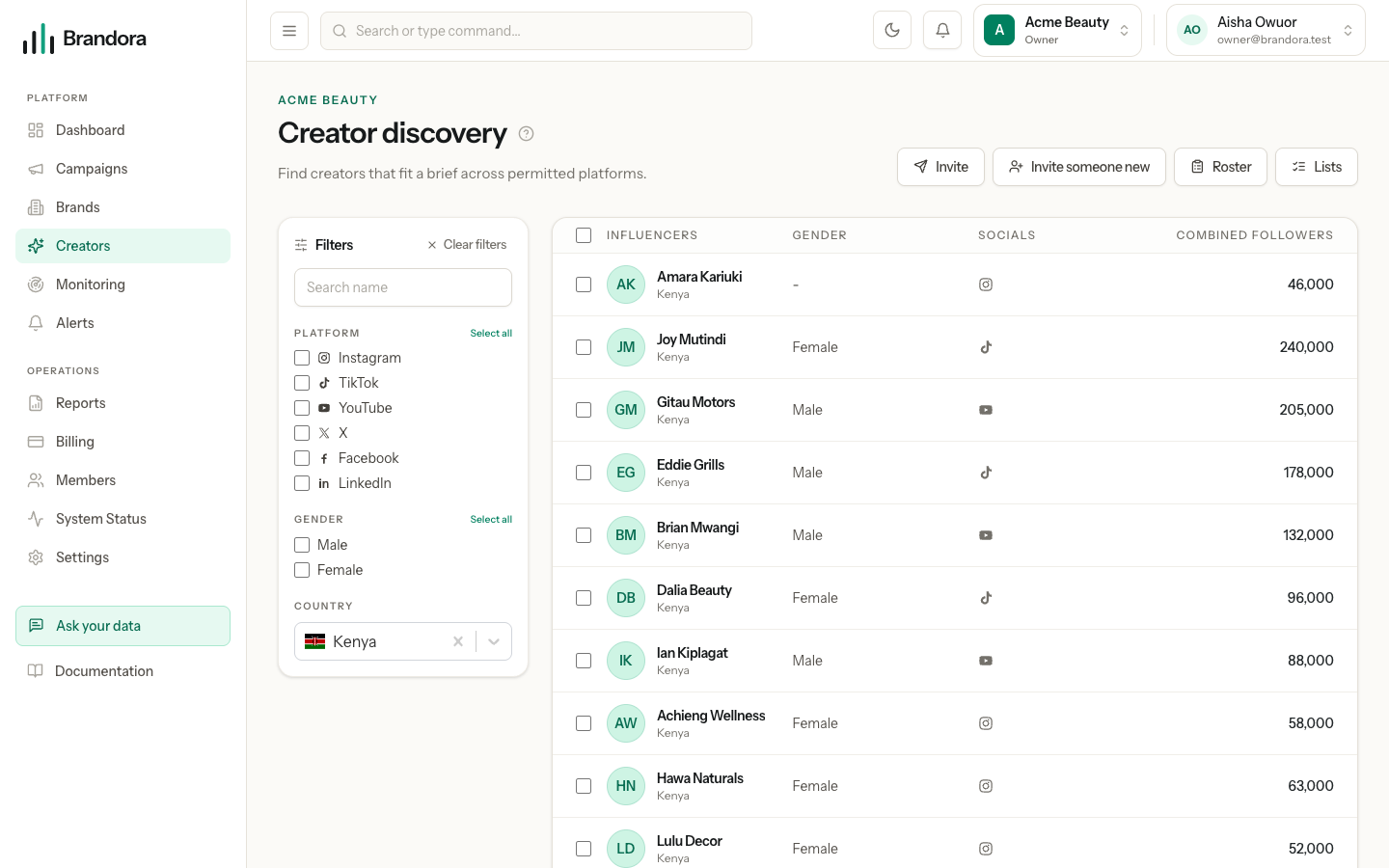
The filters
Every filter is a hard constraint. Each one removes creators from the result set, and nothing later in the pipeline can put them back. There is no filter that merely nudges the ranking.
| Filter | In the filter rail | Values |
|---|---|---|
| Platform | Yes, multi-select | Instagram, TikTok, YouTube, X, Facebook, LinkedIn |
| Gender | Yes, multi-select | Male, Female |
| Country | Yes | A single country |
| Free text | Yes | See below |
| Category | Available through the API only | A category word such as beauty |
| Language | Available through the API only | A language code |
| Minimum and maximum followers | Available through the API only | Numbers |
| Minimum engagement rate | Available through the API only | A percentage |
Your country filter is seeded once from a server-resolved guess at where you are, never from anything the browser claims. Change it or clear it and Brandora will not override you again.
Note: There is no age filter, and no age is shown anywhere in discovery. That is deliberate. The catalog has no age data, and inventing one would mean presenting a guess as a fact. The exact age and age band you record on your own roster are organization-private and never reach discovery, the catalog or any public page.
Results come back as a single page of up to 25 creators, ordered by the catalog's influence score. There is no "load more" and no pagination yet, so tighten filters rather than scrolling for more.
The free-text box, and what it actually does
The search box translates a small, fixed vocabulary of words into structured filters. It recognises:
- Category words: beauty, lifestyle, fashion, food, travel, technology, fitness, wellness, music, entertainment.
- Country names and codes: Kenya, Tanzania, Uganda, Rwanda, Nigeria, and their two-letter codes.
- Follower bands: nano, micro, macro, mega, each of which becomes a follower range.
Everything else is ignored. The translation cannot produce a platform, a gender, a language or an engagement threshold, and it can never decide that a creator qualifies or does not. It only ever adds a category or a country to what you already chose, and any filter you set explicitly in the rail always wins over anything the text produced.
Warning: The box is labelled "Search name" but it does not search names. Typing a creator's name matches nothing in the vocabulary, which means no filters are added and you get the unfiltered catalog back, not an empty result. Use the filters to narrow, and open the creator from your roster if you are looking for a specific person.
This is the part of discovery most often misunderstood, so to be explicit: no language model runs in a discovery search. The translation is plain keyword matching that you could predict on paper, and the search itself is a deterministic database query. Run the same search twice and you get the same rows in the same order.
The fit score and its evidence
Every result is scored for fit and comes back with an explanation of that score. The score is decision support, not a measurement, and Brandora deliberately does not present it as science.
It is a weighted blend of seven components, each on a 0 to 100 scale:
| Component | Weight | Derived from |
|---|---|---|
| Audience fit | 0.25 | How well the creator's country and language match what you asked for |
| Content fit | 0.20 | How much the creator's categories overlap the categories you asked for |
| Engagement quality | 0.15 | The creator's engagement rate, rescaled |
| Performance consistency | 0.15 | Not derivable from catalog data today |
| Brand safety | 0.10 | Not derivable from catalog data today |
| Geographic fit | 0.10 | Country overlap with what you asked for |
| Commercial efficiency | 0.05 | Whether the creator sits inside the follower range you asked for |
A component with no data is not treated as a zero. Its weight is redistributed across the components that do have data, so a partial score still reads on a 0 to 100 scale and a creator is never penalised for a gap in Brandora's knowledge. When no component has data at all, the score is empty rather than zero.
Two consequences follow. Performance consistency and brand safety are always missing today, so a quarter of the default weight is always redistributed. And a search with no filters scores almost nothing: with no categories, countries or follower range to compare against, only engagement quality survives, and the score reduces to a rescaled engagement rate. Fit scores are worth reading once you have told discovery what you are looking for, and not before.
Alongside the score, each result carries an explanation with five parts: why it matched, its strong signals, its weak signals, what data was missing, and where the data came from with a freshness stamp.
Note: The results table currently shows the creator, gender, platforms and combined followers. The fit score and the explanation are computed and returned by the search API, but the discovery screen does not display them yet.
Provenance
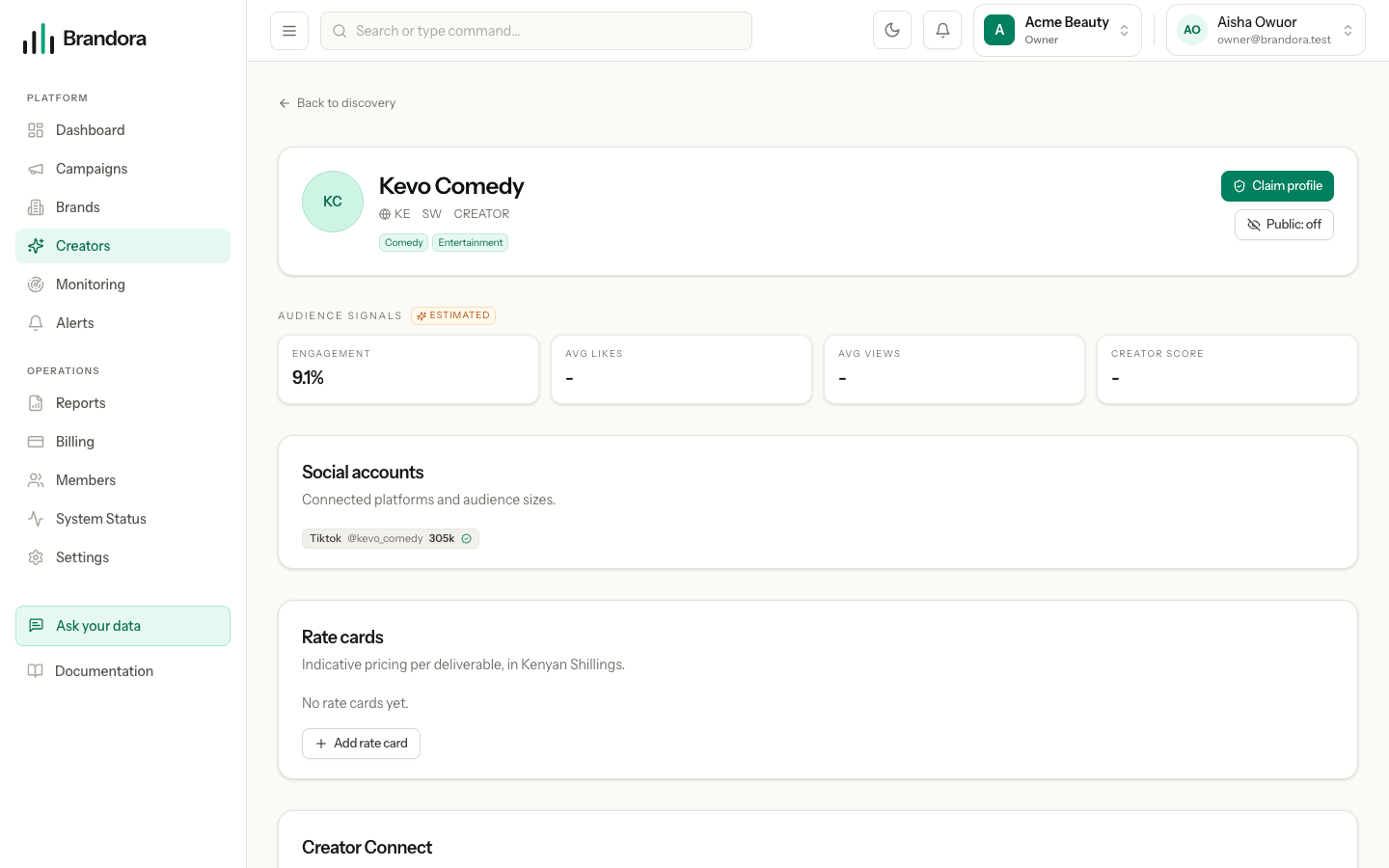
Every discovery result is public or estimated data, and it is labelled that way. Nothing in the catalog is a verified first-party figure: those only exist for accounts a creator has connected through Creator Connect and authorized your organization to see. A follower count here is an estimate, and Brandora will not quietly substitute it for a first-party number that is missing.
Read the freshness stamp with that in mind. For a catalog result it records when Brandora read the record, not when the underlying figure was captured at the platform.
What you can do with results
Click a creator's name to open their profile, with their platform accounts, audience signals and, for Managers and above, your organization's private rate cards.
Managers and above get checkboxes on the result rows and a bulk action bar with Add to roster, which adds every selected creator behind an inline confirm step, and Invite, which sends each selected creator an invitation.
Any member down to Viewer can run a search and open a profile. Adding to the roster and inviting are Manager and above, and the page says so with a visible hint rather than a dead button.
Note: Plans describe a monthly number of creator searches. Searching is not metered or blocked against that number today, so treat it as guidance rather than a wall you will hit.
Discovery does not yet support saved searches, lookalike or similar-creator search, or exporting results to a file. To keep a set of creators, add them to your roster or group them on a creator list.