User guide
Client guest review
Share a scoped review link with a client who has no account, and control exactly what they can see and do.
A guest review link lets a client approve content without an account, a password or a seat in your workspace. It is scoped to one submission, it expires, it can be revoked, and what the person on the other end can see is decided by the API rather than by the page they open.
Creating a link
Open the review drawer for a deliverable and find the Client review link section. Creating a link requires the Manager role or above.
You can optionally supply a recipient email address, a recipient name and a short message. With an address, Brandora queues the invitation through the notification outbox and tells you it was sent; without one, you copy the URL and send it yourself.
The link the app creates permits commenting and approving, is capped to the client lane, and expires in seven days. The API accepts a wider range if you drive it directly: commenting and approving are each an explicit boolean, the lanes are an explicit list, and the lifetime is anything from 1 to 365 days.
Warning: The raw token is shown exactly once, at the moment the link is created. Brandora stores only a SHA-256 hash of it, so it cannot be recovered or shown again, by you or by support. Copy it before you close the drawer. If you lose it, revoke the link and mint a new one.
Creating a link writes submission.guest_link_created to the audit trail with the permissions it was granted, and emailing one writes submission.guest_link_emailed with the recipient address.
What the link is scoped to
A guest review link points at one submission. Not the deliverable, not the campaign, not the workspace. There is no session, no organization context and no membership behind it: every request the guest makes is authorised entirely by the token in the URL.
Through it, a guest can see:
- the submission's status,
- the current version only, with its caption and how many media assets are attached,
- comments in the client lane, and nothing else.
They cannot see the version history, the internal lane, the creator lane, the deliverable, the brief, the budget, the fees, the other creators on the campaign, or any other submission.
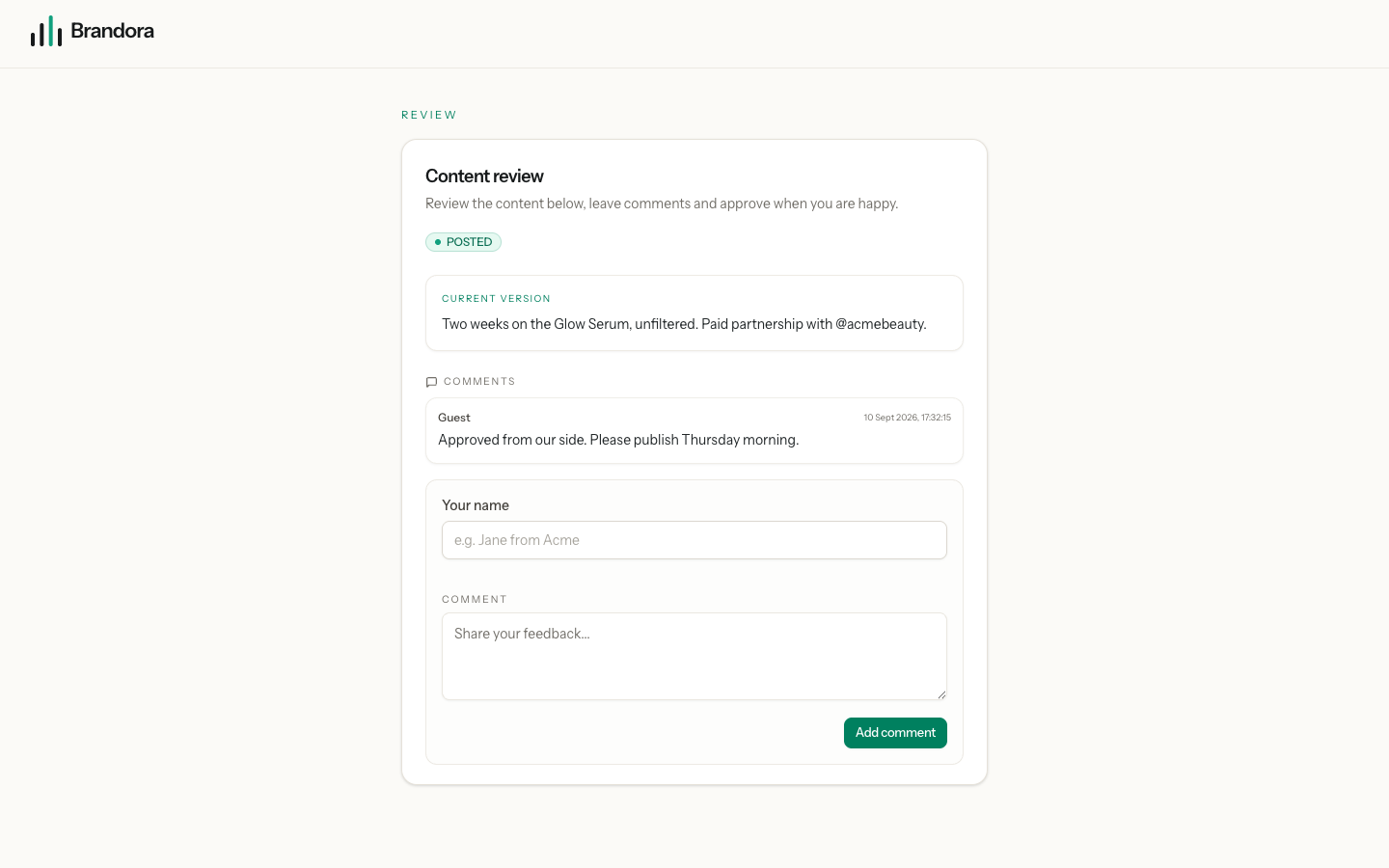
The lane cap is not a matter of the page choosing what to draw. The public endpoint takes whatever lanes the link claims and filters them down to the client lane before it queries anything, so a link minted with INTERNAL in its lane list still returns client comments and only client comments. Read Submissions and approvals for how the three lanes work on the inside.
Warning: A guest link is a bearer credential. Anyone holding the URL is the client as far as Brandora is concerned, including anyone the client forwards it to. There is no second factor and no identity check, so the guest names attached to comments are typed in, not verified. Send links to individuals, keep the lifetime short, and revoke rather than rely on expiry when a review is done.
What a guest can do
Comment. Only when the link was created with commenting allowed; otherwise the attempt is refused with GUEST_CANNOT_COMMENT. The guest types their own name, up to 120 characters, and a comment of up to 5,000. It is stored in the client lane, attributed to the typed name rather than to a user account, and every Manager and above in your workspace is emailed about it.
Approve. Only when the link was created with approval allowed; otherwise the attempt is refused with GUEST_CANNOT_APPROVE. Approval is not a special back door: it runs through the same approval state machine as an internal approval, stamps the approval time, notifies the assigned creator and notifies your managers that the approval came in over a guest link.
Both actions are rate limited to 30 requests a minute, and both stamp the link's last-used time so you can tell whether a client ever opened it. Guest actions are audited as submission.guest_comment_created and submission.guest_approved, each carrying the id of the link that produced them.
Note: Because approval follows the same machine, a guest can only approve a submission that is already IN_REVIEW. If you send a link while the submission is still SUBMITTED, the client's Approve press is refused with a conflict. Press Start review before you send the link.
How long a link lives, and how to revoke it
Every link has an expiry, defaulting to seven days out. A link is usable while it has not been revoked and its expiry is still in the future.
Revoking is immediate and permanent: the link is stamped as revoked and is refused from that moment, whatever its expiry says. Revoking requires the Manager role or above and is audited as submission.guest_link_revoked.
To the person holding it, an expired link and a revoked link are the same thing: the request is refused with GUEST_LINK_UNUSABLE, and the page tells them to ask for a fresh one. A token that never existed comes back as GUEST_LINK_NOT_FOUND. Neither response reveals anything about the submission behind it.
Warning: The app does not yet list a submission's existing guest links or offer a revoke control. Both the listing and the revoke action exist in the API and are the only way to withdraw a link today.
Known limitation
Warning: The public review page does not currently render. The endpoint resolves the token and returns the submission correctly, but the page expects a different response shape and reports that it cannot open the review. Until this is fixed, a client following a guest link will see an error rather than the content, so collect client sign-off another way and record it in the client comment lane. The link, its scope, its expiry and its revocation all behave as described above.
The platform-faithful preview described in the product plan, where the client sees the post rendered as it will appear on the platform, is also not built. The current version is presented as caption text with a count of attached media.