User guide
Deliverables and the calendar
Define what each creator owes, when it is due, and how the content calendar is derived from those dates.
A deliverable is the unit of work a specific creator owes a specific campaign: three Instagram Stories from Wanjiku, due on the fifth. Everything downstream reads from these rows, including the content calendar, the per-creator platform breakdown, the approval workflow and the completion figures on the analytics tab.
What a deliverable holds
Open a campaign and select the Deliverables tab. Each row carries:
- Type. Free text up to 60 characters, such as
Instagram Reel,YouTube RevieworTikTok Video. There is no fixed vocabulary, so agree on your own wording early and keep it consistent: the type is what a creator, a client and a report all read. - Platform. One of
instagram,facebook,tiktok,youtubeorx, or none. Unlike the type, this is a validated field, and it is the field every platform breakdown in the product is derived from. - Quantity. A whole number of one or more, defaulting to one.
- Due date. The date and time the work is owed.
- Creator. Optional, but if set, the creator must already be assigned to this campaign. Pointing a deliverable at anyone else is refused with
DELIVERABLE_ACTOR_NOT_ON_CAMPAIGN, so the roster on the Creators tab is the only door in. - Requirements. A structured map for per-deliverable hashtags, mentions and notes. It overrides the campaign brief where it is set, and it is what content matching compares against. It is set through the API today, not from the add form.
- Status. One of the eight values below.
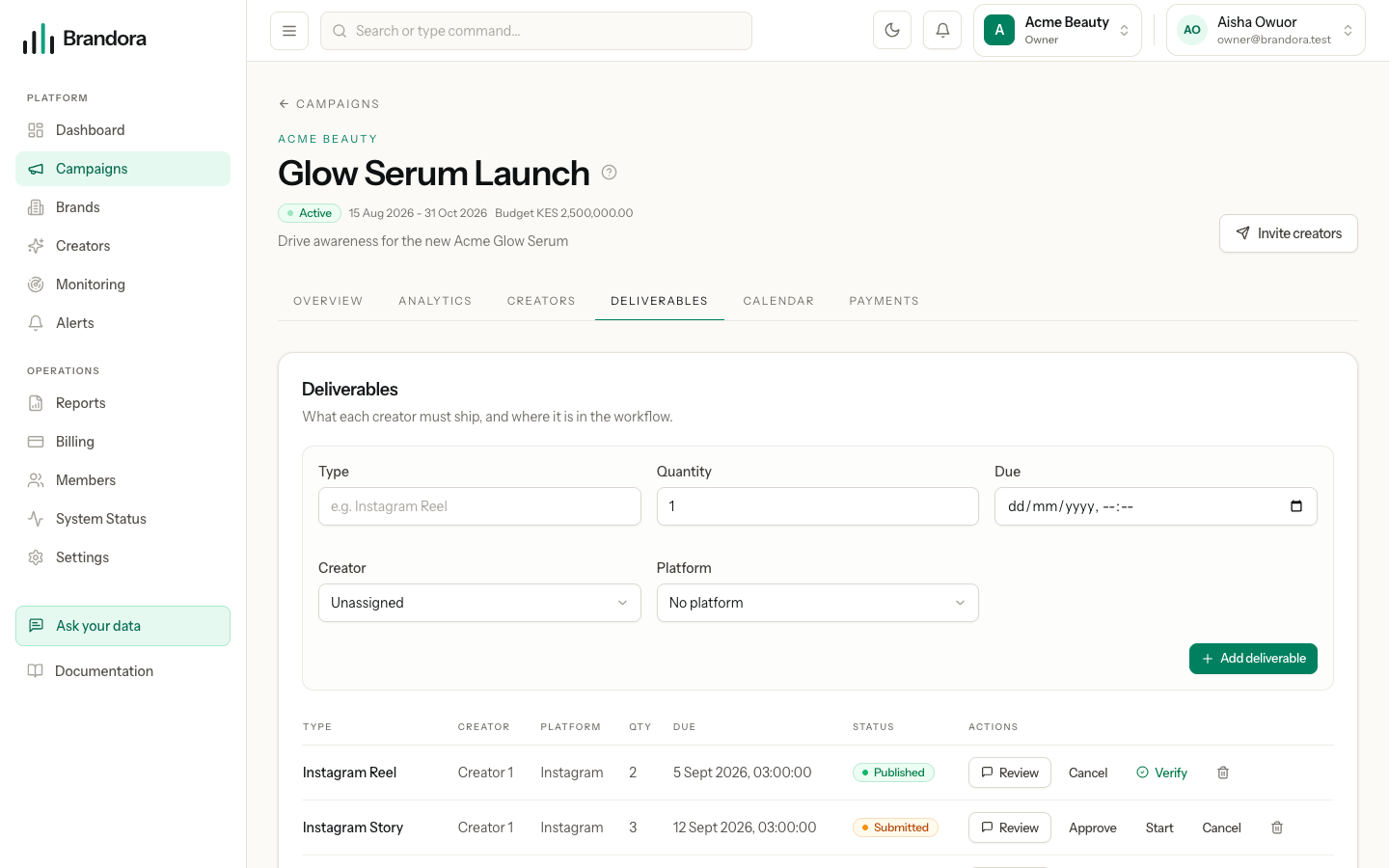
You can add deliverables in two places, and they write the same rows: the add form at the top of the Deliverables tab, and the per-creator panel on the Creators tab, which pre-selects that creator. Adding, editing and deleting a deliverable requires the Manager role or above; any member can read them.
Note: Quantity is a number on one row, not a set of rows. A deliverable of three Stories is one state machine and one due date, so it moves to approved or published as a single unit. If you need the three to be tracked separately, create three deliverables.
The state machine
Every deliverable moves through an explicit machine. The API validates each move, so a request that tries to skip steps is refused with DELIVERABLE_TRANSITION_ILLEGAL and nothing is written.
| State | What it means | Who can move it | Where it can go |
|---|---|---|---|
PLANNED | Agreed and scheduled, not started. The default for a new deliverable. | Manager and above | IN_PROGRESS, SUBMITTED, CANCELLED |
IN_PROGRESS | The creator is making it. | Manager and above | SUBMITTED, CANCELLED |
SUBMITTED | Content has been handed over for review. | Manager and above | APPROVED, back to IN_PROGRESS, CANCELLED |
APPROVED | Signed off, not live yet. | Manager and above | PUBLISHED, CANCELLED |
PUBLISHED | Live on the platform, not yet proven. | Manager and above | VERIFIED through the evidence flow only, or CANCELLED |
VERIFIED | Proven live by deterministic evidence. | Nobody. It is terminal. | Nowhere |
OVERDUE | Past its due date and not finished. Applied by the reconciliation pass; the app never offers it as a choice. | Manager and above, to rejoin the pipeline | IN_PROGRESS, SUBMITTED, APPROVED, CANCELLED |
CANCELLED | Dropped. Reachable from every non-terminal state. | Nobody. It is terminal. | Nowhere |
Each move stamps its own timestamp: submitted_at, approved_at, published_at and verified_at are written the first time the deliverable reaches that state and are not overwritten afterwards. Every change is written to the audit trail as campaign.deliverable.updated with the fields that changed, alongside campaign.deliverable.created, campaign.deliverable.deleted and campaign.deliverable.verified. Workspace administrators can read that trail through the audit endpoint.
The Deliverables tab renders a button for the moves available from the current state, and no button at all for a terminal one. That is a convenience, not the rule: the same checks run in the API, so a request made directly against it is judged identically.
Warning: VERIFIED is unreachable through an ordinary status change. Sending it is refused with DELIVERABLE_TRANSITION_REQUIRES_EVIDENCE, and so is creating a deliverable that is already verified. The only way in is the verification flow, which requires a live URL or a platform content id that has itself been verified. No human, and no AI suggestion, can mark work fulfilled without that proof. See Proof of fulfillment and tracking.
How overdue works
Overdue is not a flag someone sets. A deliverable is overdue when it has a due date, that date is in the past, and its status is not one of the finished states: APPROVED, PUBLISHED, VERIFIED or CANCELLED. Every deliverable the API returns carries an is_overdue value computed at that moment from the stored due date and the clock, which is what draws the red Overdue badge beside the status pill in the table and the calendar.
The OVERDUE status in the table above is the same rule written into the row itself, by a reconciliation pass that flips past-due unfinished work in a deterministic order. That pass exists as a service but is not on the schedule today, so in practice you will see the derived badge rather than a stored OVERDUE status. Treat the badge as the truth: it cannot go stale, because it is recomputed on every read.
The calendar
The Calendar tab is derived, not authored. There is no separate calendar table and no free-text columns to keep in sync: the server reads the campaign's deliverables, groups them by their due date, orders real dates ascending, and returns each day with its items. Every item carries the deliverable id, its type, platform, status, derived overdue flag, assigned creator and due date, so what you see is always the current state of the deliverables themselves.
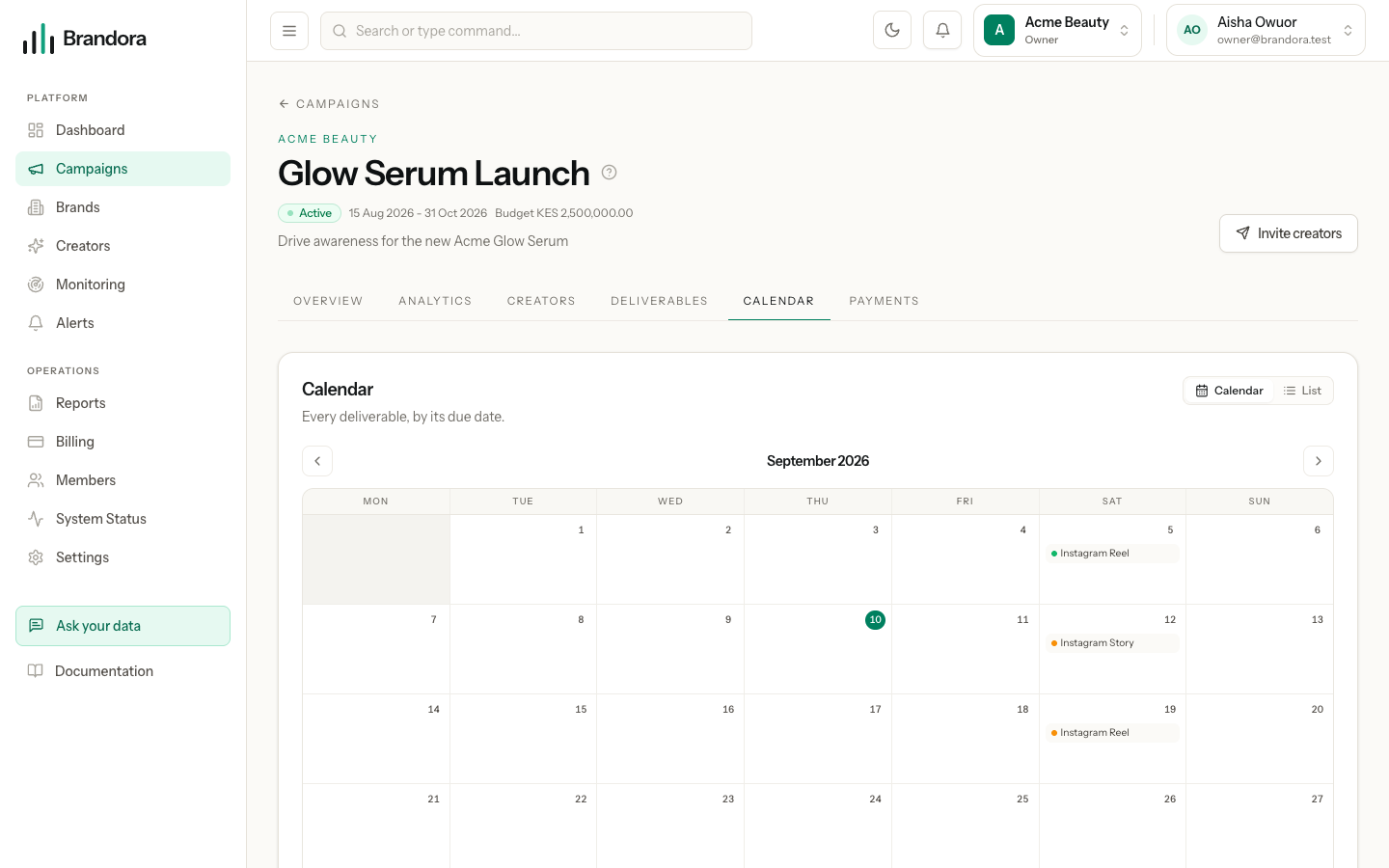
Two views share that data. The month grid shows a coloured dot per deliverable on each day; the list view is a straight agenda in date order. Selecting an item opens a detail panel with its type, platform, status, creator and due date. Nothing on this screen can be edited: to move a date, change the deliverable.
Warning: A deliverable with no due date cannot be placed on the calendar. The add form makes the due date mandatory for exactly that reason, but the API allows one to be created without it, and a campaign that contains an undated deliverable currently fails to load the calendar view rather than listing it as unscheduled. Give every deliverable a date.
The same derivation drives the platforms column on the Creators tab. Rather than storing a "creator does Instagram" fact anywhere, the server groups the campaign's deliverables by creator and platform on read, and returns a count and a breakdown by status for each pairing. Change a deliverable's platform and the column changes with it.
From a deliverable to a submission
The Review button on each row opens the approval drawer, where the creator's content is versioned, commented on in three separate lanes, and approved. Moving a deliverable to SUBMITTED and approving a submission are related but distinct: the deliverable status tracks the commitment, the submission status tracks the artefact. Read Submissions and approvals next.
Deleting a deliverable is a soft delete, so the row leaves the tables and the calendar but the record is retained. Cancelling is usually the better move when work was genuinely dropped, because it keeps the history visible and stops the row counting as outstanding.