User guide
Proof of fulfillment and tracking
Capture proof that content went live, track links and conversions, and audit why a piece of content was matched to a campaign.
Proving a campaign delivered is a separate question from believing it did. This page covers the evidence that lets a deliverable become verified, the tracking links and conversions behind traffic figures, and how to audit exactly why a piece of content was ever attached to a campaign.
Evidence: what counts as proof
Evidence is recorded against a deliverable. Each item has a type and a source, and the pair decides whether it counts as proof on its own.
| Type | What it is | Verified when recorded |
|---|---|---|
LIVE_URL | The public URL of the post as it went live | Yes, always |
PLATFORM_CONTENT_ID | The platform's own identifier for the post | Yes, always |
SCREENSHOT | An image of the post | Only when the source is a connected account |
MANUAL_NOTE | A written note from a person | Only when the source is a connected account |
The source records where the item came from: CONNECTED_ACCOUNT for an account the creator connected, PROVIDER for a licensed data provider, CREATOR for something the creator sent you, and STAFF for something your team recorded.
The rule is deterministic: an item is marked verified on the spot when its type is machine-checkable, or when its source is a connected account. A screenshot from a creator is stored, kept and auditable, but it is never self-verifying, because a person can send a picture of anything.
Recording evidence requires the Manager role or above and is written to the audit trail as deliverable.evidence_recorded, carrying the type, the source and whether it was auto-verified.
Warning: There is no evidence form in the app yet. Evidence is recorded through the API, which means the Verify button on a deliverable will fail with a missing-evidence error until at least one live URL or platform content id has been recorded that way.
Verifying a deliverable
Verification is the only way a deliverable reaches VERIFIED, and it is guarded twice.
- The deliverable must carry at least one
LIVE_URLorPLATFORM_CONTENT_IDwhose verified timestamp is set. Without it, the request is refused withEVIDENCE_REQUIREDorDELIVERABLE_MISSING_VERIFIED_EVIDENCEand nothing changes. - The Verify button on the Deliverables tab additionally requires the deliverable to be
PUBLISHED. Verifying anything earlier is refused withDELIVERABLE_NOT_READY_FOR_VERIFICATION.
When both hold, the deliverable moves to VERIFIED, its timestamp is stamped, the campaign's actual spend is recomputed from every verified deliverable and its creator's agreed fee, and campaign.deliverable.verified is audited. That is the link between proof and money: actual spend only recognises work carrying machine-checkable evidence.
Note: Nothing marks a deliverable fulfilled because a model thought a post looked related. AI is not in this path at all. See Deliverables and the calendar for the full state machine.
Matching content to a campaign
Separately from evidence, content can be associated with a campaign so it feeds the analytics. Every association records how it was made, how confident that was, and the facts behind it.
| Method | What it means when you are auditing |
|---|---|
RULE | A deterministic rule fired: the content fell inside the campaign window and carried at least one required hashtag or mention. The stored evidence lists which ones matched. |
MANUAL | A person in your workspace attached it. The confidence is whatever they supplied, or the deterministic score if they supplied none. Trust it exactly as far as you trust that person's judgement. |
PROVIDER | An external data provider asserted the link. The provider, not Brandora, is the authority for it. |
CONNECTED_ACCOUNT | The content came from an account the creator connected to Brandora, so the creator identity behind it is first-party rather than inferred. |
The deterministic rule is narrow on purpose. Content matches when both of these hold:
- its publish time falls inside the campaign's start and end dates, and
- it carries at least one of the required hashtags or required mentions.
Required tags come from the campaign brief, and a deliverable's own requirements override the brief where set. Tags are normalised first, so a leading # or @, capitalisation and stray whitespace do not matter. Confidence is the fraction of required tags the content carries, from 0 to 1: match one of two required hashtags and it is 0.5.
If there is no overlap, or the campaign has no required tags at all, no association is made. The rule reports no match rather than guessing.
Every association stores its evidence, and that is what you read when someone asks why a post is in a report: whether the content fell inside the window, the campaign's start and end dates, the content's publish time, the required hashtags and mentions, and exactly which of them matched.
Warning: Automatic matching is not yet running. The rule engine and its confidence scoring exist and are tested, but no scheduled sweep applies them, so no RULE or PROVIDER association is produced today. Associations are created through the API as MANUAL or CONNECTED_ACCOUNT, and the deterministic evidence above is stored alongside them either way. There is no association screen in the app yet.
Tracking links
A tracking link belongs to a campaign and can be pinned to one creator and one deliverable, so clicks read back by who drove them.
Creating one takes a destination URL and an optional set of UTM parameters. Brandora mints a unique eight-character short code, and the public redirect at /t/{code} increments the click count, records the time, referrer, user agent and UTM query parameters of the most recent click, and sends the visitor to the destination. Only active links redirect. Creating and deleting links requires the Manager role or above; any member can read them.
Note: A click is not a conversion. The redirect never creates a conversion event, so the click count on a link and the conversions on a campaign are independent figures and should be quoted as such.
Warning: Tracking links have no screen in the app yet. Create, list and delete them through the API.
Conversions
Conversions are recorded, not detected. Each one carries a value in minor units, a currency, a time it occurred, and optionally a tracking link or a discount code. Brandora then assigns the attribution method deterministically, in this order:
- a tracking link was supplied, so the method is
TRACKED_LINK, - otherwise a discount code was supplied, so the method is
DISCOUNT_CODE, - otherwise the method is
MANUAL.
A tracking link supplied with a conversion must belong to the same campaign, or the request is refused with TRACKING_LINK_NOT_IN_CAMPAIGN. The conversions summary returns the count, the total value and a breakdown by method, so a manually keyed conversion is never counted as a tracked one.
Reading the numbers
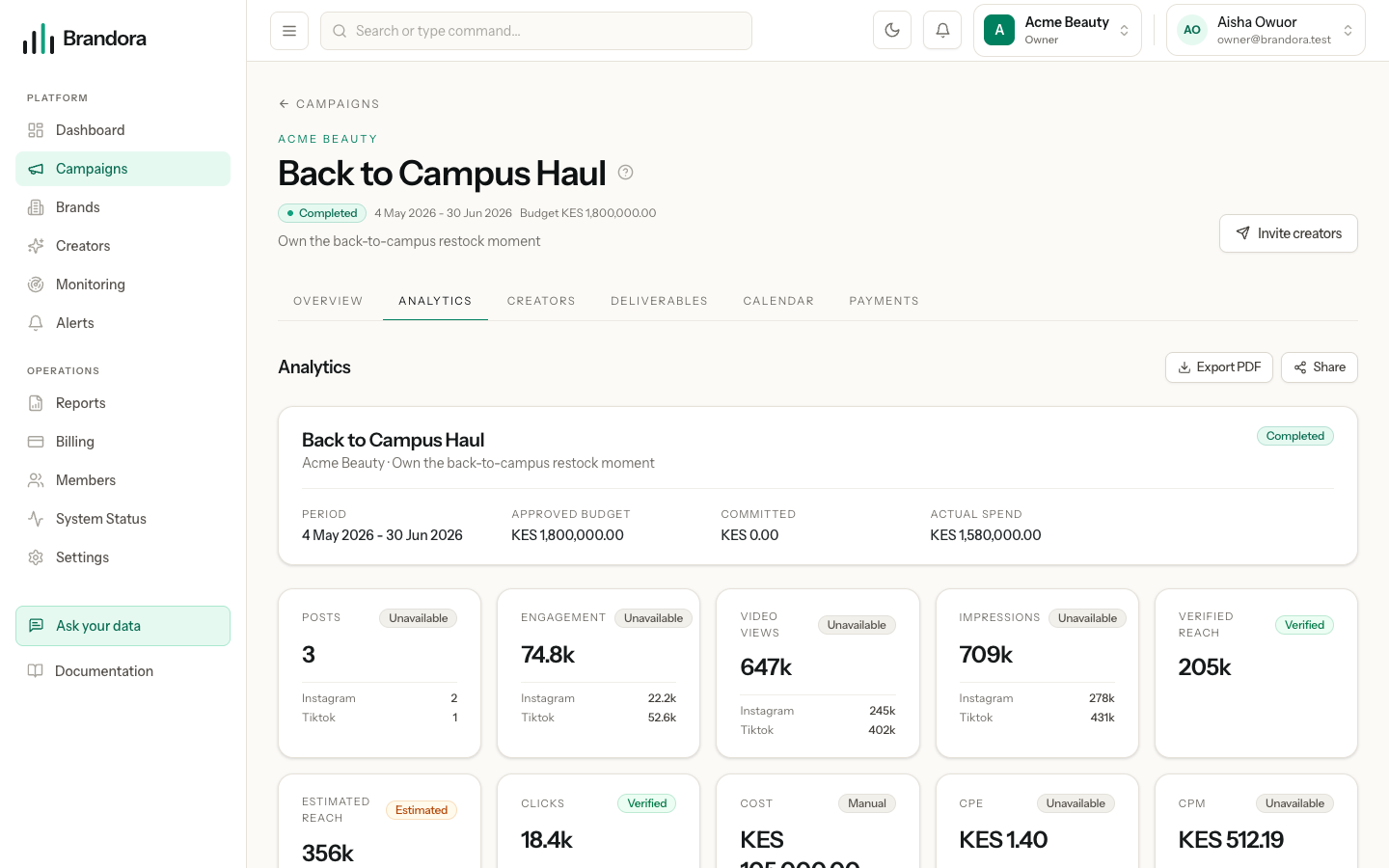
Every figure on the Analytics tab is computed through the metric registry, so a formula has one definition rather than one per screen, and each carries a provenance chip: Verified, Estimated, Public, Licensed, Manual or Unavailable.
Verified reach and estimated reach are two metrics, not two labels on one. Verified reach sums only first-party figures; estimated reach sums provider estimates and public figures. They are never added together, and a missing verified figure is never quietly replaced by an estimate. Clicks come from your own redirect and are first-party. Cost is the agreed fees you typed in, so it is labelled manual.
Missing data reads as unavailable, never as zero: a campaign with no engagement data shows a blank rather than a confident nought.
Three operational figures come straight from the records this page describes: deliverable completion is verified over total deliverables, creator coverage is assigned creators with associated content over assigned creators, and budget utilisation is committed plus actual over approved.
Note: Cost per thousand is calculated against verified reach when there is any, and falls back to estimated reach when there is not, without changing its own label. Check which reach figure the campaign actually has before quoting a CPM. Cost per engagement, CPM and click-through rate are all null rather than zero when their denominator is missing.