Creator guide
Connecting your social accounts
What Creator Connect collects, why it is read-only, how your access token is handled, and how to disconnect.
Creator Connect is the read-only link between a social account you own and your creator profile. This page says which platforms can be connected today, exactly what is collected and how often, how your access token is handled, and how to stop it.
What you can connect today
Instagram, and only Instagram. The portal asks the server which platforms are live rather than guessing, so the verify page can tell you the truth about the environment you are in: either a real Instagram app is configured and pressing the button sends you to Instagram, or none is, and the page says it is in demo mode and connects a labelled sample account instead.
Instagram publishes insights for Business and Creator accounts only. A personal account can be approved, but the figures that come back will be sparse.
If you see another platform on your media kit, it is a handle you or an agency typed in. Those are stored as self-reported and are never treated as connected. See Your media kit and directory listing.
Read-only, and what that means in practice
Brandora asks Instagram only for read permissions: one covering your profile and posts, one covering insights about them. It never asks for permission to publish, to manage comments, or to read or send messages. Those are write permissions, they are treated as a separate capability that would need its own review and its own consent, and they are not part of Creator Connect.
So nothing Brandora holds can post as you, reply as you, delete anything or change a caption.
What is collected
Each sync reads:
- Your account: username, account type, follower count and number of posts.
- Your recent posts: up to twenty five of the most recent, with the caption, the post type, the permalink and the time it was published.
- Figures per post: views, impressions, likes, comments, shares and saves, whichever Instagram reports for that post type.
- Account reach, over a rolling window that is currently a year.
- Your audience split: the share of your followers by country, age band and gender, over the last ninety days.
Fields Instagram does not publish are left empty rather than filled in from something that looks similar. Instagram exposes no profile views figure and no follower language split on this API, so those stay blank, and it withholds follower demographics entirely for small accounts. When a section is refused, that section alone is skipped and the rest of the sync still lands.
Every figure stored this way is marked as coming from your connected account, with the source and the time it was collected, so it can sit beside an estimate without ever being confused for one.
How often it syncs
The first pull is queued the moment you finish verifying, so your media kit has figures within a queue run rather than a day. After that, a daily maintenance pass picks up any connection whose last sync is more than twenty four hours old and refreshes it, spread over a window so every creator is not pulled in the same second.
You can also press Sync now on /creator/connections. Pressing it twice costs one round trip to Instagram, not two, and the new figures appear once the job finishes rather than the instant the button is pressed.
Your access token
The token Instagram issues is encrypted before it is stored, and it is the one field the connection record hides from itself. It is never included in any API response, never written to a log, and never shown to you, to an agency, or to support. It is decrypted in memory only long enough to make a request to Instagram, and thrown away again.
The connections table shows how many days are left before the token expires, and nothing more. When a token is inside ten days of expiring, Brandora renews it in the background; if the renewal fails, the old token is kept rather than replaced with nothing.
Warning: If anyone asks you for the token, or for your Instagram password, it is not us. Brandora never needs either, and the approval screen at Instagram is the only place your credentials are ever typed.
What the connection states mean
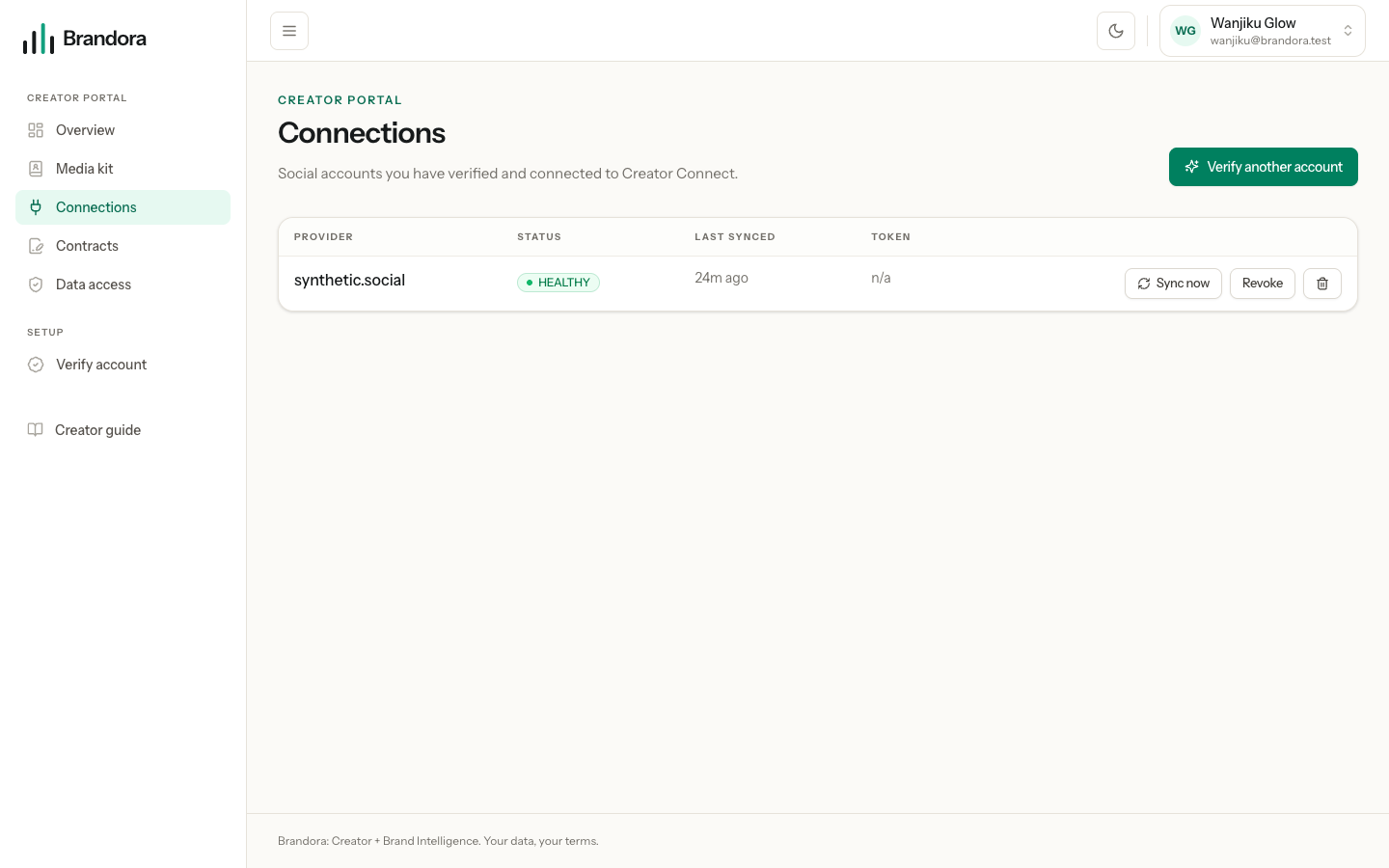
| State | What it means | What to do |
|---|---|---|
CONNECTED or HEALTHY | Collecting normally. | Nothing. |
STALE | The last sync did not complete. The reason is shown in plain words. | Wait for the next daily run, or press Sync now. |
REAUTH_REQUIRED | Instagram no longer accepts the token, usually because access was withdrawn or a password changed. | Press Reconnect and approve again. |
REVOKED | You stopped collection, or Instagram told us you removed the app. | Verify again to restart it. |
DISCONNECTED | The link is closed. | Verify again to restart it. |
Nothing is deleted when a connection goes stale or needs reauthorizing. Collection pauses, and the figures already collected stay where they are.
Stopping it: revoke or delete
The two buttons on the connections page do different things, and the difference is deliberate.
Revoke stops collection and keeps what was already collected. Future syncs are cancelled, the account stops showing as connected on your media kit, and any workspace with access can no longer read anything new. Nothing is erased.
Delete removes the connection and the encrypted token, the posts and figures collected through it, the account record behind them, and every workspace authorization that pointed at that connection. It does not touch your creator profile, your campaigns, your contracts or your rate cards. It cannot be undone, and reconnecting later starts collecting from scratch.
Warning: Neither button removes Brandora from your Instagram account, because Instagram publishes no way for an app to withdraw its own access here. To cut it off at the source, open Instagram, then Settings, then Website permissions, and remove Brandora. Instagram tells us when you do, and the connection is marked revoked on our side too.